
Smarton Docs
  • English
  • Lietuvių
  • 中文
  • Русский
  • Türkçe
  • Українська
Documentation Developers Resources

Get started

Quick Guide
How to start using system?
Global search
SmartOn AI
Filter settings
User Settings
Extended Information
How to change the password?
Copy paste functionality
Personal menu

Proman ERP

Dashboard
Overview
Orders
Orders
Deleted orders
Product returns
Import of orders products
How To create documents?
Creating a new order
Creating a new invoice
Sending emails
Order tabs
Order manage
How to send notifications to customers
Production
Production operations
How to start a production?
Employee Operation
Shipments
How to create, manage Shipments?
Shipment manage
Shipment Container
Jobs
Calendar
How to create calendar?
Boards
Order products
Stored products
Product manage
Operations
How to start an operation?
Operation manage
Operations tabs
Sales
Projects
Sales Tables
Table layout
Draw your own floor plan
Customer reviews
Order proposals
Exposition
Catalogue builder
Customers
Customer card
Agents
Carriers
Sales events
Clients portal
Client in PROMAN
CRM Calendar
Technology
Articles
Technology Information
Article materials
Article stored as material
Article Print Report
Article subproducts
Create article
Article manage
Article Options
How to add devices to print check to kitchen?
How to change article name?
How to change article price?
How to add additional choose to POS?
Article barcode
Article Operation
Import articles
Import article materials
Article Types
Test Types
Article categories
Parameters
Functions
Expressions
Expression examples
Features
Development
Article Tests
Comments
Resources
Resources
Create operation
Create workgroup
Create workplace
Warehouses
Time options
Premises
Maintenance
Subcontractors
Cameras
Materials
Materials
Adding suppliers
Writing off materials
Material import
Stock
Materials Categories
Materials Types
How to add an alternative material type unit?
Dimentions
Formulas
Materials Purchases
Purchases without Vat
How to credit a purchase?
Importing a purchase
Movement
Materials Reservations
Materials Tests
Barcode types
Inventory
Inventory
Inventory Categories
Inventory Types
Inventory Purchases
Inventory Tests
Staff
Employees
How to change the language?
Employee questionnaire
Create an employee
Create employee login
Employee work-shifts
Limitations
Import employees
Employees Permissions
Departments
Add specialisation
Tabel
Monthly
Weekly
Daily
Salary
Salary Taxes
Vacations requests
Notifications
New Periodic Listener notification
How to create new project from email?
How to create a button Listener notification?
Subordination
Permissions
Documents
Defect act
Document quiz
Reports
Sales
Orders sales
Hourly Orders
Production
Total amount of articles sold
Staff
Loading
Materials
Tables
Dynamic Tables
Personal Tables
Charts
Scoreboards
Accounting
Invoices
Invoices products
Invoice self-service
Write invoice
Taxes
Balance
Settling bolt invoices
Accounting Reports
EDS
i.mas
Sodra
Payments
Paypal Gateway
Stripe Gateway
Bank transactions
Swedbank Gateway
SEB Gateway
Invoice payments
Purchase payments
Salary Payment
Tax payments
Other Ledger Entries
Cash payments
Cash registers
Payment Types
Coupons types
Suppliers
Importing a supplier
Supplier tab
Services
Carriers
Assets
Purchases
How to create a material purchase?
Importing invoices by email
Edisoft invoice import
Scan Invoice
Inventorization
Projected consumtions
Accounting Settings
General Ledger management
Bookkeeping details
Salary
Currencies
VAT settings
Workday types
Workweek types
Banks
Balance keys
Settings
System
Speed button
Templates
Examples of Templates
ESC-POS invoice printing
Production templates
Invoice templates
Order templates
Organisation templates
Template context
Shipment templates
Article templates
Dynamic fields
Integrations
MQTT Printer
Android device with integrated printer and card reader
Bluetooth printer
Tele2 APN
Softpos
Payment terminal
Softpos
Citadele Phone POS
Terminal
Paynt
Ashburn LT
EPS LT
Viva
Worldline Baltic
Tapaya
Devices
Barcode scanners
Scales
Cash Drawer
DatecsFiscalPrinter
UniversalZplPrinter
UniversalPosPrinter
PromanFiscalPrinter
CheckboxUaFiscalPrinter
Device troubleshoot
DHCP Disabled Error: How to Enable DHCP for Epson Printers
How to Print a Printer Test Slip (IP Slip)
Hardware manuals
SmartOn printer link
P3T
Z150
Swift 2 Pro
TCK837
Files
Bluetooth printer
Z100
Z92
woocommerce api
Connections
shopify
i.MAS
Sodra
EDS
Bolt food
Uber eats
TTLock
Prestashop
Invoice123
SEB every-pay integration
Stripe
Countries
Logs
Time restrictions
Discounts
Menu
Translations

POS & payments

QrandPay
Configuration
Tips
QrandPay Staff
QrandPay Guest
SmartOn Pay
Android
SmartOn terminal
iOS
Dineq
Set up Dineq
Your restaurant page
How guests book
Managing bookings
Booking widget for your website
POS
Getting started
Self-service kiosk
Serving guests
Open a table
Add extras to a product
Take an order
Change an item
Change an order
Bill and payment
Invoice for a guest
Create a customer
Organiser
Reservations
Orders
Payments
Tables
Devices
Products
Materials
Delivery
Options
Reports
Cash in and out
Coupons
Device settings
Kitchen
Guest screens
Customer display
Order number screen
Self-ordering with QR
Android app
Settings
Setting up the POS
Company POS settings
Printers and cash registers
Categories
Products
How to create an article with multiple choices, that are counted automatically at checkout?
Tables
Staff and logins
Permissions
How to prevent an employee from deleting a product from the table?
How to prevent an employee from applying a discount?
How to prevent an employee from deleting an Order in the table?
How to add permissions to all Department?
How to add Confirmation PIN if waiter wants to change waiter?

Apps

Applications
Shop
Setting up a facebook chat plugin
Setting up "Stripe"
Using the shop
How to activate the shop
How to add products to the shop?
How to add a description?
Smarttag
Health
SHOP
Set Up the Facebook Chat Plugin
Shop page builder
Set Up "Stripe"
Using shop
How to activate the shop
Shop settings
Shop settings table
Technical information settings
How to add google Map
How to change colors?
How to add browser tab logo?
How to add main logo?
How to add products to shop?
How to add description?
How to add Technical information?
How to translate technical description
Smarttag
How to start using Smarttag?
Health
Quick guide how to create an appoinment
How to create a patient?
How to change an appoinment values?
How to create specialisation?
How to add new location?
Fiscal.lt
How to do return in fiscal.lt?
User guide
iOS Apps
Smarton Back Office
SmartOn PBX
Getting started
Signing in
Roles: who can do what
Set up your phone system
What’s new
Making and taking calls
Phone in the browser
Phone app
Your status
Your calls
Call history
A call’s details
Voicemail
Contacts
Pipeline
Call back list
Calls in SmartOn
Results
Dashboard
Insights
Your account
Notifications
Managing the team
People
Regions
Queues
Queues now
Call flows
The flow editor
Elements
Prompts
Hold music
Opening hours
Caller lists
Settings
AI call analysis
Carriers
Numbers
Branding
SmartOn
Audit log
Troubleshooting
Platform console
Chat

API reference

API basics
Orders API
Customers API
Technology API
Materials API
Inventory API
Staff API
Accounting API
Reservations API
POS API
PosPublic API
Fiscal.lt API

Formulas & queries

Dynamic Queries
Material filters

Help & FAQ

Questions

Troubleshooting

Bluetooth printer troubleshoot instructions
How to Port Forward
Default gateway address
How to print printer internal ip

Tax & compliance

FR0791A
Powered by Smarton.app
  1. Documentation
  2. Staff
  3. Employees

Import employees

There is a simple way to import employees from an excel file. You can get the tamplate by clicking here.
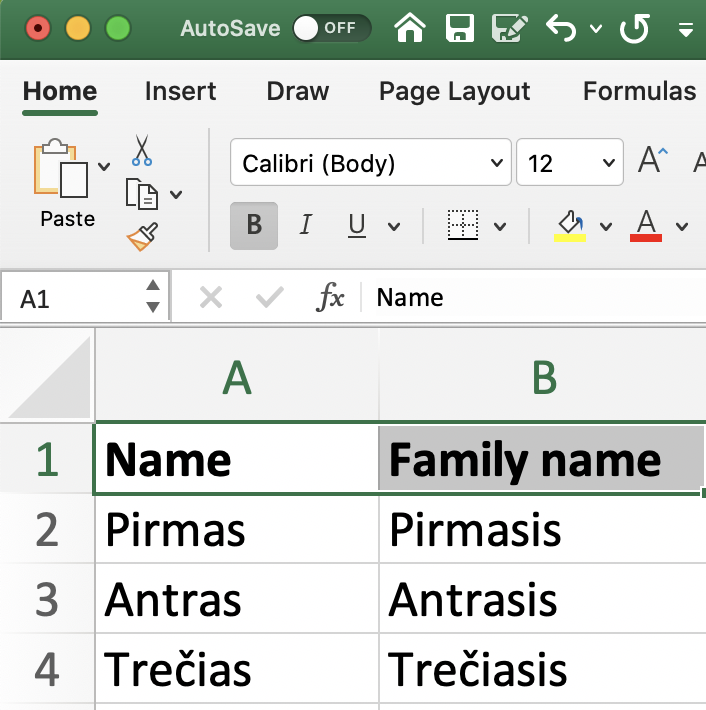
Excel import template

After entering all needed information, import the file to SmartOn:

1. Go to Staff

2. Then- Employees

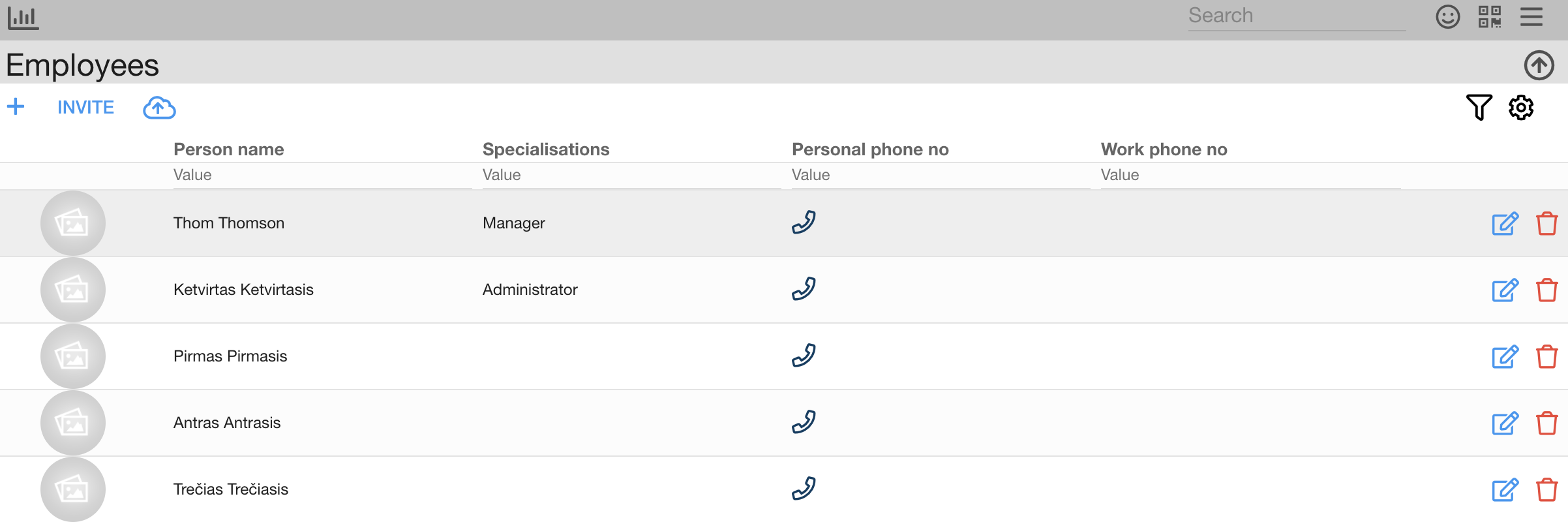
3. Click on the cloud iconImport (cloud upload icon)

4. Upload the excel file 

Now, you can see employees in the system:
Last updated 2024-10-07

Previous Limitations Next Employees Permissions

On this page

      Type at least 2 characters

      ↑↓ to navigate ↵ to select Esc to close
      Docs AI Assistant