Smarton Docs
  • English
  • Lietuvių
  • 中文
  • Русский
  • Türkçe
  • Українська
Документация Разработчикам Ресурсы

Начало работы

Краткое руководство
[T] How to start using system?
[T] Global search
[T] SmartOn AI
Фильтры
Пользовательские настройки
[T] Extended Information
[T] How to change the password?
[T] Copy paste functionality
[T] Personal menu

Proman ERP

[T] Dashboard
[T] Overview
Заказы
Заказы
[T] Deleted orders
[T] Product returns
Импорт заказов товаров
Как?
Создать новый заказ
создать новый счет
Отправить электронное письмо
Вкладки заказов
Управление заказами
[T] How to send notifications to customers
Производство
Производственные операции
Как создать производство?
[T] Employee Operation
Отгрузки
Как?
Управление отгрузкой
Транспортный контейнер
Вакансии
Календарь
Как создать?
Доски
Заказывает товары
Хранимые продукты
Управление продуктом
Операции
Как начать работу?
Управление операциями
Вкладки операций
Продажи
Проекты
[T] Sales Tables
[T] Table layout
[T] Customer reviews
Предложения по заказу
Статьи
[T] Catalogue builder
Клиенты
Управление клиентами
Агенты
Перевозчики
Мероприятия по продажам
Портал для клиентов
[T] Client in PROMAN
[T] CRM Calendar
Tехнология
Статьи
[T] Technology Information
[T] Article materials
[T] Article stored as material
[T] Article Print Report
[T] Article subproducts
Создать статью
Управление статьей
Параметры статьи
[T] How to add devices to print check to kitchen?
[T] How to change article name?
[T] How to change article price?
[T] How to add additional choose to POS?
[T] Article barcode
Статья Операция
Импортировать статьи
Импортировать материалы статьи
Типы статей
[T] Test Types
Категории статей
Параметры
Функции
Выражения
[T] Expression examples
Особенности
Развитие
Тесты
Комментарии
Ресурсы
Ресурсы
Создать операцию
Создать рабочую группу
Создать рабочее место
[T] Warehouses
Параметры времени
Помещения
Техническое обслуживание
Субподрядчики
Камеры
Материалы
Материалы
[T] Adding suppliers
[T] Writing off materials
Импорт материалов
Материальный запас
Категории материалов
Тип материала
[T] How to add an alternative material type unit?
Размеры
Формулы материалов
Покупка материалов
[T] Purchases without Vat
[T] How to credit a purchase?
[T] Importing a purchase
Движение материалов
Существенные оговорки
Испытания материалов
Типы штрих-кодов
Изобретатель
Изобретатель
Категории изобретателей
Типы изобретателей
Покупка
Тесты
Персонал
Сотрудники
[T] How to change the language?
[T] Employee questionnaire
Создать сотрудника
Создать логин сотрудника
Смены сотрудников
Ограничения
Импорт
Разрешения
Департаменты
Добавить специализацию
Стол
[T] Monthly
[T] Weekly
[T] Daily
[T] Salary
[T] Salary Taxes
[T] Vacations requests
Уведомления
Уведомление о новом периодическом прослушивателе
Как создать новый проект из электронной почты?
[T] How to create a button Listener notification?
Подчинение
Разрешения
Документы сотрудников
[T] Defect act
[T] Document quiz
Отчеты
Продажи
[T] Orders sales
[T] Hourly Orders
Производство
[T] Total amount of articles sold
Персонал
Загрузка отчетов
Материалы
Таблицы
Таблицы
Персональные столы
Графики
Табло
Бухгалтерский учет
Счета-фактуры
[T] Invoices products
[T] Invoice self-service
[T] Write invoice
[T] Taxes
Баланс
[T] Settling bolt invoices
Отчеты
[T] EDS
[T] i.mas
[T] Sodra
Платежи
[T] Paypal Gateway
[T] Stripe Gateway
[T] Bank transactions
[T] Swedbank Gateway
[T] SEB Gateway
[T] Invoice payments
[T] Purchase payments
[T] Salary Payment
[T] Tax payments
[T] Other Ledger Entries
[T] Cash payments
[T] Cash registers
[T] Payment Types
[T] Coupons types
Поставщики
[T] Importing a supplier
Создать поставщика
Услуги
[T] Carriers
Активы
Покупки
[T] How to create a material purchase?
[T] Importing invoices by email
[T] Edisoft invoice import
[T] Scan Invoice
[T] Inventorization
[T] Projected consumtions
Настройки
[T] General Ledger management
[T] Bookkeeping details
[T] Salary
[T] Currencies
[T] VAT settings
[T] Workday types
[T] Workweek types
[T] Banks
[T] Balance keys
Настройки
Система
Кнопка скорости
Шаблоны
[T] Examples of Templates
[T] ESC-POS invoice printing
Производственные шаблоны
Шаблоны счетов-фактур
Шаблоны заказов
Шаблоны организаций
Контекст шаблона
Шаблоны отгрузки
Шаблоны статей
Динамические поля
Интеграции
[T] MQTT Printer
[T] Android device with integrated printer and card reader
[T] Bluetooth printer
[T] Tele2 APN
[T] Softpos
[T] Payment terminal
[T] Softpos
[T] Citadele Phone POS
[T] Terminal
[T] Paynt
[T] Ashburn LT
[T] EPS LT
[T] Viva
[T] Worldline Baltic
[T] Tapaya
[T] Devices
[T] Barcode scanners
[T] Scales
[T] Cash Drawer
[T] DatecsFiscalPrinter
[T] UniversalZplPrinter
[T] UniversalPosPrinter
[T] PromanFiscalPrinter
[T] CheckboxUaFiscalPrinter
[T] Device troubleshoot
[T] DHCP Disabled Error: How to Enable DHCP for Epson Printers
[T] How to Print a Printer Test Slip (IP Slip)
[T] Hardware manuals
[T] SmartOn printer link
[T] P3T
[T] Z150
[T] Swift 2 Pro
[T] TCK837
[T] Files
[T] Bluetooth printer
[T] Z100
[T] Z92
[T] woocommerce api
[T] Connections
[T] shopify
[T] i.MAS
[T] Sodra
[T] EDS
[T] Bolt food
[T] Uber eats
[T] TTLock
[T] Prestashop
[T] Invoice123
[T] SEB every-pay integration
[T] Stripe
Страны
Журналы
Ограничение по времени
Скидки
Меню
Переводы

POS и платежи

[T] QrandPay
[T] Configuration
[T] Tips
[T] QrandPay Staff
[T] QrandPay Guest
[T] SmartOn Pay
[T] Android
[T] SmartOn terminal
[T] iOS
[T] Dineq
[T] Set up Dineq
[T] Your restaurant page
[T] How guests book
[T] Managing bookings
[T] Booking widget for your website
[T] POS
[T] Getting started
[T] Self-service kiosk
[T] Serving guests
[T] Open a table
[T] Add extras to a product
[T] Take an order
[T] Change an item
[T] Change an order
[T] Bill and payment
[T] Invoice for a guest
[T] Create a customer
[T] Organiser
[T] Reservations
[T] Orders
[T] Payments
[T] Tables
[T] Devices
[T] Products
[T] Materials
[T] Delivery
[T] Options
[T] Reports
[T] Cash in and out
[T] Coupons
[T] Device settings
[T] Kitchen
[T] Guest screens
[T] Customer display
[T] Order number screen
[T] Self-ordering with QR
[T] Android app
[T] Settings
[T] Setting up the POS
[T] Company POS settings
[T] Printers and cash registers
[T] Categories
[T] Products
[T] How to create an article with multiple choices, that are counted automatically at checkout?
[T] Tables
[T] Staff and logins
[T] Permissions
[T] How to prevent an employee from deleting a product from the table?
[T] How to prevent an employee from applying a discount?
[T] How to prevent an employee from deleting an Order in the table?
[T] How to add permissions to all Department?
[T] How to add Confirmation PIN if waiter wants to change waiter?

Приложения

[T] Applications
[T] Shop
[T] Setting up a facebook chat plugin
[T] Setting up "Stripe"
[T] Using the shop
[T] How to activate the shop
[T] How to add products to the shop?
[T] How to add a description?
[T] Smarttag
[T] Health
[T] SHOP
[T] Set Up the Facebook Chat Plugin
[T] Shop page builder
[T] Set Up "Stripe"
[T] Using shop
[T] How to activate the shop
[T] Shop settings
[T] Shop settings table
[T] Technical information settings
[T] How to add google Map
[T] How to change colors?
[T] How to add browser tab logo?
[T] How to add main logo?
[T] How to add products to shop?
[T] How to add description?
[T] How to add Technical information?
[T] How to translate technical description
[T] Smarttag
[T] How to start using Smarttag?
[T] Health
[T] Quick guide how to create an appoinment
[T] How to create a patient?
[T] How to change an appoinment values?
[T] How to create specialisation?
[T] How to add new location?
[T] Fiscal.lt
[T] How to do return in fiscal.lt?
[T] User guide
[T] iOS Apps
[T] Smarton Back Office
[T] SmartOn PBX
[T] Getting started
[T] Signing in
[T] Roles: who can do what
[T] Set up your phone system
[T] What’s new
[T] Making and taking calls
[T] Phone in the browser
[T] Phone app
[T] Your status
[T] Your calls
[T] Call history
[T] A call’s details
[T] Voicemail
[T] Contacts
[T] Pipeline
[T] Call back list
[T] Calls in SmartOn
[T] Results
[T] Dashboard
[T] Insights
[T] Your account
[T] Notifications
[T] Managing the team
[T] People
[T] Regions
[T] Queues
[T] Queues now
[T] Call flows
[T] The flow editor
[T] Elements
[T] Prompts
[T] Hold music
[T] Opening hours
[T] Caller lists
[T] Settings
[T] AI call analysis
[T] Carriers
[T] Numbers
[T] Branding
[T] SmartOn
[T] Audit log
[T] Troubleshooting
[T] Platform console
[T] Chat

Справочник API

[T] API basics
[T] Orders API
[T] Customers API
[T] Technology API
[T] Materials API
[T] Inventory API
[T] Staff API
[T] Accounting API
[T] Reservations API
[T] POS API
[T] PosPublic API
[T] Fiscal.lt API

Формулы и запросы

Динамические запросы
Фильтры материалов

Помощь и FAQ

[T] Questions

Устранение неполадок

[T] Bluetooth printer troubleshoot instructions
[T] How to Port Forward
[T] Default gateway address
[T] How to print printer internal ip

Налоги и соответствие

[T] FR0791A
Powered by Smarton.app
  1. Документация
  2. Персонал
  3. Сотрудники

Импорт

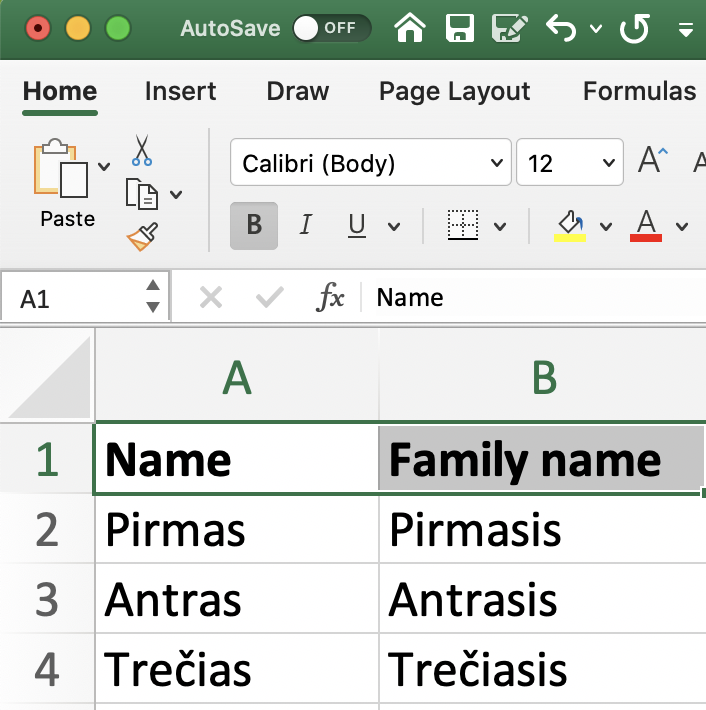
Есть простой способ импортировать сотрудников из файла Excel. 

Excel import template

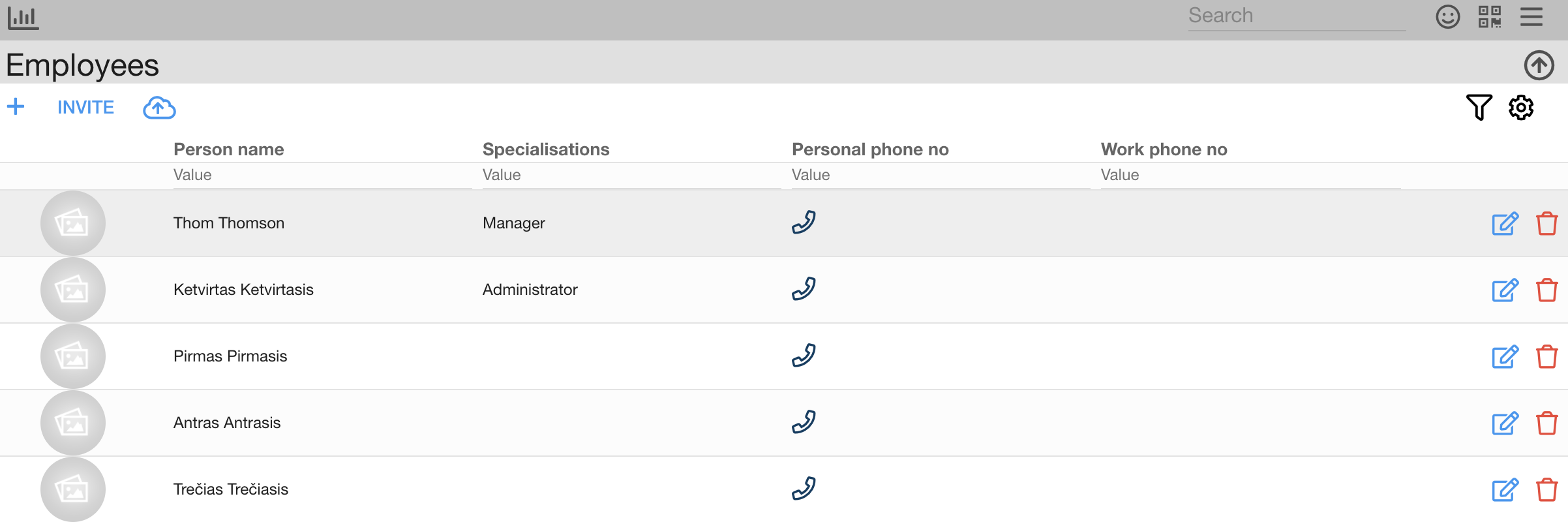
Кнопка «Импорт»  Импорт (значок облака со стрелкой) открывает файловый браузер для выбора файла и его импорта в систему.

Обновлено 2021-04-23

Назад Ограничения Далее Разрешения

На этой странице

      Введите не менее 2 символов

      ↑↓ навигация ↵ выбрать Esc закрыть
      Docs AI Assistant