
 English
General Ledger management
| How to find General Ledger? |

To find the general ledger settings, you should:
1. Click on 

2. Click on 
| How to get incomes or outcomes to Balance automatically with one VAT? |
If you would like to get a sum and have only one VAT, you should:
1. Click on
Now you can see the dialog table:

2. Choose a Debit or Credit accounting category
3. Click

You can choose these Accounting categories:
| Accounting category | Where could you set it? |
| Sales total | |
| Sales sum | |
| Sales VAT | |
| Total Purchase sum | |
| Purchase sum | |
| Purchase VAT | |
| Salary expenses crdt | |
| Salary expenses crdt | |
| Sales income crdt | Invoice Credit |
| Sales income dbit | Invoice Debit |
| Purchase expenses crdt | |
| Purchase expenses dbit | |
| Cash in crdt | |
| Cash in dbit | |
| Card in crdt | |
| Card in dbit | |
| Material purchase | |
| Materials consumption | |
| Inventory purchase | |
| Inventory consumption | |
| Fix assets purchase | Assets purchase |
| Fix assets amortization | |
| Fix assets | Income to assets |
| Products purchase | |
| Services purchase | |
| Other purchase |
| Purchases |
Material Purchase
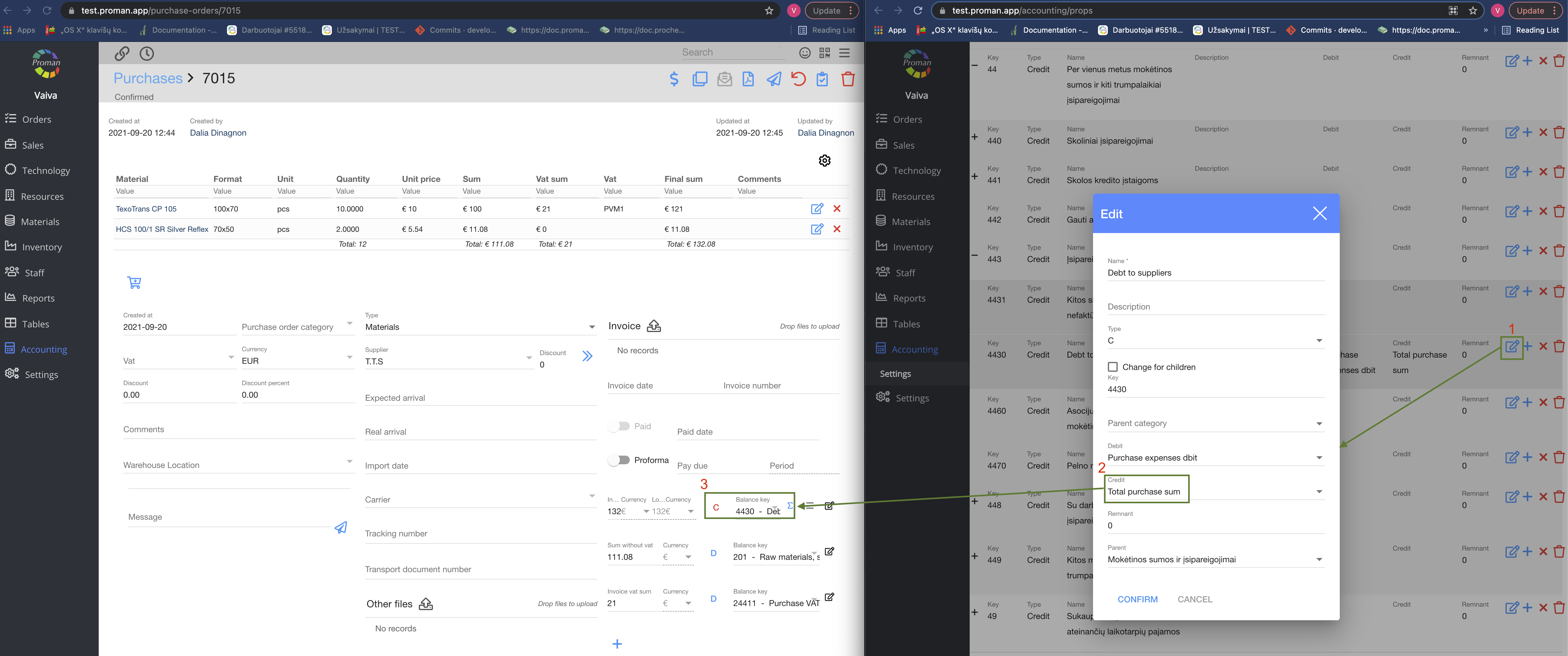
1. Click on 
2. Choose a Credit accounting category ;
3. Now you can see it in Material Purchase.
Invoice


1. Click on
2. Choose a Debit accounting category;
3. Now you can see them in the Invoice.
| How to get incomes or outcomes to Balance automatically with different VATs? |
First of all, you should set the accounting category to VAT
VAT

1. Click on
2. Click 
3. Click
4. Choose an accounting category in the Balance Key;
5. Click

6. Do it to all VAT types
| Materials |
You should set Materials Types and Materials:
Materials Types

1. Click on 

2. Choose an accounting category in Balance Key;
Material

1. Click 
2. Choose Materials;
3. Make sure that the Material's Type is the same as you have set up before
4. Choose VAT
Now you can see Accounting categories in the Materials Purchase


| Products / Articles |
Articles Types

1. Go to 


2. Choose a type;
3. And choose an accounting category in Balance Key

Articles

1. Click on
2. Choose an Article;
3. Make sure that the Article's Type is the same as you have set up before in Articles Types;
4. Choose VAT.
Now you can see different Accounting categories in the Product Purchase


| How to edit General Ledger Balance key? |

1. Go to

2. Then-

3. Click

4. Choose a balance category from the list